Faber
The AI architect for your codebase
AI architect desktop app that orchestrates coding agents through structured, task-driven workflows
Git worktree isolation enables parallel AI agent work without conflicts
Embedded MCP server for real-time agent progress reporting and coordination
Cross-platform desktop app with Tauri combining Rust backend and React frontend
The problem
I started Faber because I wanted a workflow built around tasks and specs, and around handing them to agents. The loop I was after: talk to an agent to plan and scope a piece of work, break it down into actionable chunks, then assign those chunks to agents and run them in parallel or one after another.
CLI coding agents like Claude Code and Codex are remarkably capable, but working with more than one at a time quickly turns into juggling terminals, branches and half-finished changes. Two agents in the same checkout step on each other, it is hard to see what each one is doing, and there is no shared picture of what work is planned, running or done. I wanted the structure of a real development workflow – a backlog, isolated branches, review before merge – with the agents doing the typing.
Faber is built with Faber. I don't know much Rust, so the backend is mostly the work of agents; the React frontend is a collaboration between them and me.
How it works
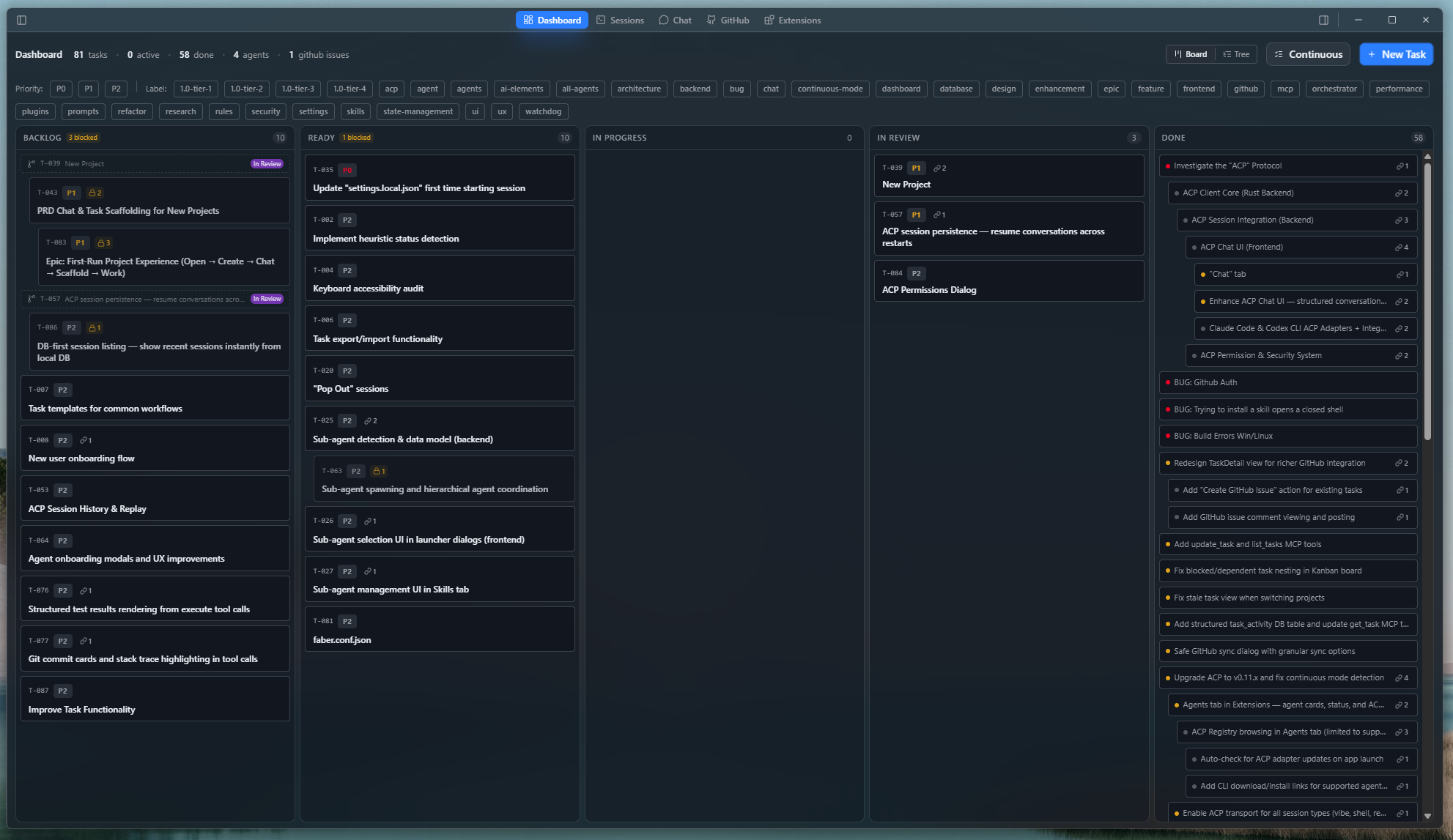
Work starts on a task board. Tasks live in Faber's own database, which keeps the repository clean. Projects that want to share their tasks through the repo can keep them as Markdown files with YAML frontmatter instead, so the plan lives next to the code and comes along with git pull. Switching between the two resolves any differences task by task.
Launching a task creates a git worktree and a dedicated branch, and starts the chosen agent inside it. The agent commits to its own branch – never to the one you have checked out – which is also what lets several tasks run at once without colliding. Nothing reaches your branch until you merge it.
While they work, agents use the tools Faber provides through an embedded MCP server to report progress, raise problems and flag when they need your attention. That drives the live status on task cards and panes, and moves tasks between columns as work completes.
Key features
- Task board – Kanban with priorities, labels, dependencies and epics. With task files on disk, edits made in an editor or pulled from git show up live.
- Worktree isolation – one worktree and branch per task, reused across relaunches and review loops.
- Many projects at once – agents run across all your open projects side by side, and anything that needs you – a question, a permission, a finished review – surfaces wherever you are.
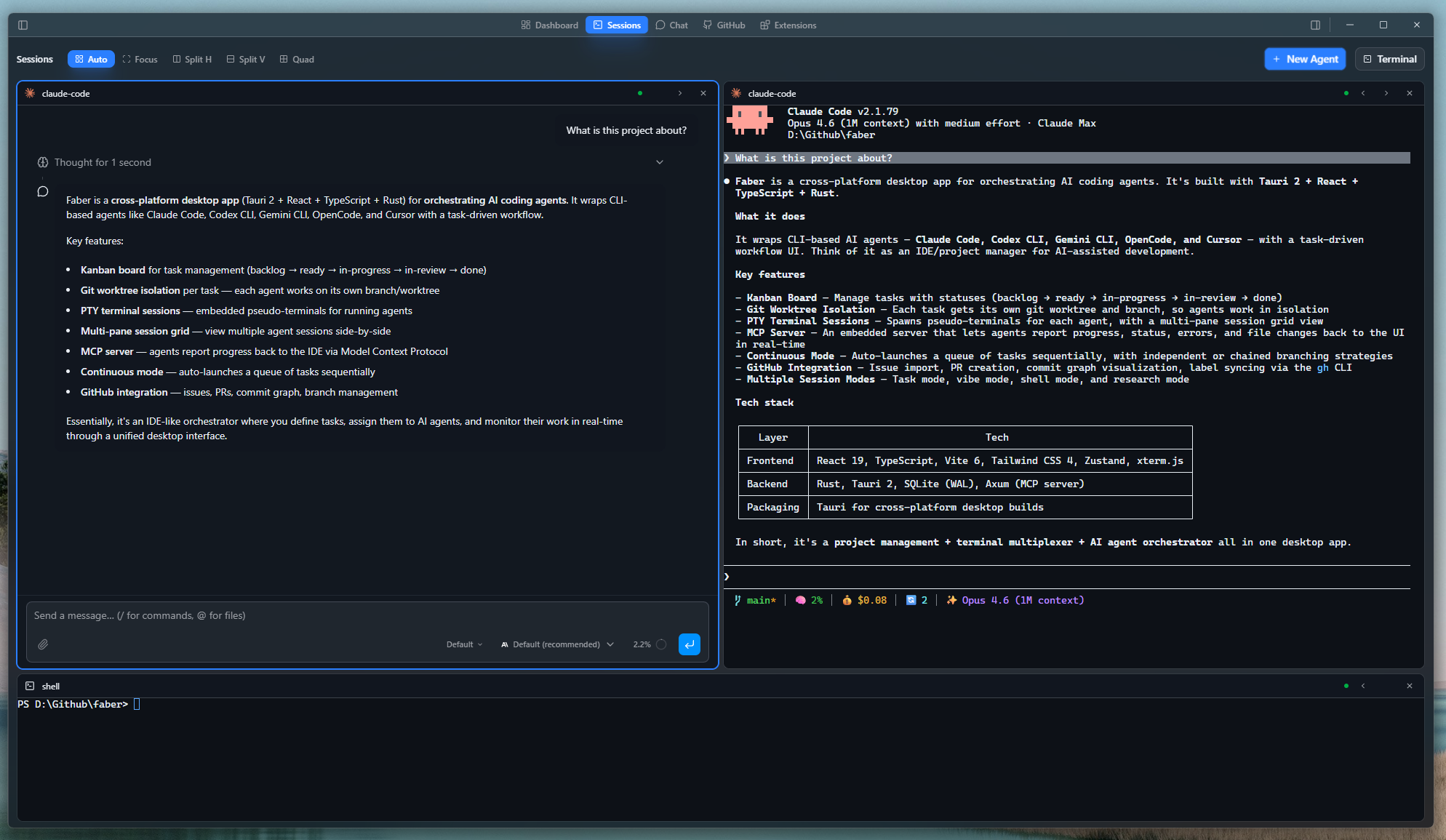
- Terminal and chat sessions – run an agent's own CLI in an embedded terminal, or talk to it through a structured chat with streaming, plans and permission prompts.
- Runs – queue tasks and let Faber launch them in dependency order with a concurrency limit, or let an orchestrating agent hand work out to sub-agents.
- Review and GitHub – diff viewer, commit graph, importing issues as tasks, and opening and merging pull requests.
- Multi-agent – works with Claude Code, Codex CLI, Cursor, OpenCode and others, auto-detected from your PATH.
Engineering notes
- Tauri over Electron. Mostly for the small download and the performance. Electron could have done the job, but I'd wanted a reason to build something real with Rust and Tauri. The Rust core runs sessions, git, terminals and the MCP server, and the interface is React.
- From Markdown to a database. The first versions only had Markdown task files. Over time, storing tasks in the database became what drove most of the task flow and UX improvements, and it's what Faber's own development uses now. Markdown files are still there for anyone who wants their tasks in the repo.
- MCP as the link to the agents. It felt like the natural extension point for two-way communication between agents and the app. It had some limitations early on, but it has been a stable foundation. Agent hooks are becoming more common, and they may eventually add to or replace the MCP server Faber bundles.
- Worktrees over branch switching. Worktrees let each agent work in its own directory without cloning the repo again or switching branches under anyone. I wanted to work that way, and it has clearly been the right call.
- Safe defaults. Permission rules and trust settings are stored only on your machine, never in project config, so a cloned repository can't grant itself extra permissions.
Where it's going: Faber 1.0
Version 1.0 is a large release, and deliberately not a rushed one. The board becomes configurable: keep it manual and start each task yourself, or turn columns into a pipeline where dropping a task launches an agent, and finishing one hands it to the next stage – implement with one model, review with another. Alongside that come a project-wide planning assistant and usage tracking across agents, and a change to where Faber runs.
Today the runtime lives inside the desktop app. In 1.0 it becomes a host: a persistent process that can run on a VM or LXC container as well as on your own machine. Projects, agents and sessions live on the host and keep working when no client is connected. A desktop connects to its own local host and several remote hosts at once, and a phone can be a host's only client – the foundation for Faber's mobile apps. Several clients can work on the same project at the same time, sharing its agents, tasks and live progress.
What I learned
Building a tool for working with agents, mostly by working with agents, taught me as much about the process as about the product.
A well-defined task beats a clever prompt. When I know the outcome I want, the task has to say so – scope, constraints, what done looks like. A vague task gets a plausible result, not the one I had in mind. Writing tasks well turned out to matter far more than how I phrased a prompt.
Iteration is the work. The first pass is rarely the final one. Plan, run, review, adjust – and make that loop cheap, because it is going to run many times. That is a large part of why Faber puts review and relaunching at the centre.
Use the right model and agent for the job. Models differ, and so do the agents built around them. Some are better at planning and scoping, some at grinding through an implementation, some at catching problems in review. On Faber itself, a few agents' UI work naturally matched what I wanted Faber to look and feel like, so they quickly became my go-to for UI and UX. Matching the agent to the task pays off more than always reaching for the same one.
Real-time at scale is hard. Many chats, several projects and live updates for all of them means terminal output, agent events, file watchers and the database all competing at once. Keeping that fast and boringly reliable has been some of the hardest work in the project.
Screenshots